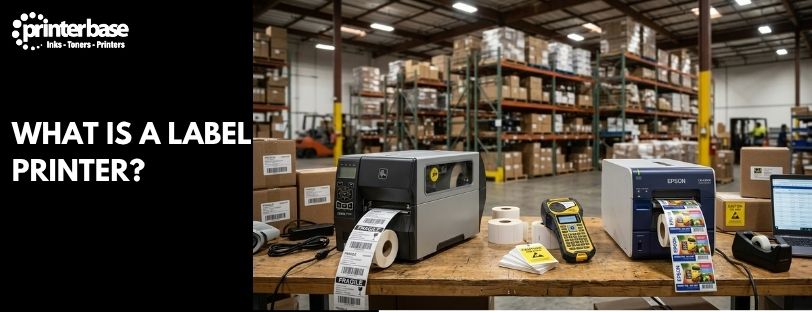
Most people think of printers as machines for documents. Businesses often need something very different. A courier needs a shipping label that scans first time. A warehouse needs a barcode on every pallet, a hospital needs a wristband on every patient, and a shop needs a price on every shelf edge.
That is the job of a label printer. It is one of the most specialised printer categories you can buy, yet it sits behind a huge amount of everyday activity, from the parcel on your doorstep to the price tag on the supermarket shelf.
Several technologies can print a label, but most label printers use thermal printing. This guide explains what a label printer is, how it works, and how Direct Thermal and Thermal Transfer differ. It also covers how mobile and handheld label printers differ, where label printers are used, and whether you need one.
What Is A Label Printer?
Standard office printers are built for sheets of A4. A label printer is built for labels. It feeds a roll or fan-fold stack of label media past its print mechanism and produces one label at a time, ready to peel and stick.
That focus shapes everything about the machine. Label printers handle self-adhesive labels, tags and wristbands in sizes ranging from narrow strips a few millimetres wide up to 4 inch (around 100 mm) shipping labels. The stock itself can be paper, polyester, polypropylene or vinyl, depending on where the label will end up.
Barcodes are where label printers earn their keep. They print sharp, high-contrast lines that scanners read first time, and many produce labels tough enough to survive damp, heat and rough handling. You’ll find them in logistics, warehouses, retail, healthcare and manufacturing.
If you’re new to printer technology in general, our guide to how a printer works covers the basics before you go further.
How Does A Label Printer Work?
The process is the same on a small desktop model and a large industrial machine. It runs in four stages.
- The printer receives data from a computer, a mobile device or a business application, such as a courier portal or warehouse system. The data arrives over USB, Ethernet, Wi-Fi or Bluetooth.
- The printer processes the text, barcodes, logos and graphics. It converts each element into a pattern of tiny dots sized to fit the label.
- The printer prints those dots onto the label media. Sensors find the start of each label, a rubber roller feeds the media forward, and the printhead applies heat to build the image line by line.
- The finished label leaves the printer through a tear bar, a peel-off point or an automatic cutter.
What Is Inside A Label Printer?
Four parts do most of the work. The printhead is a strip of microscopic heating elements that switch on and off to form the image. The platen roller sits beneath it and pushes the media forward while holding it against the printhead. Sensors detect the gap between labels, or a black mark on the backing, so each print lands in the right place. Finally, Thermal Transfer models add ribbon spindles that feed and wind the ribbon.
Once the job is processed, heat does the rest. That’s why label printers produce labels so quickly and reliably. A few specialist colour models use inkjet instead, but thermal printing dominates logistics, retail, warehousing and manufacturing.
Most Label Printers Use Thermal Printing
Walk through any warehouse, fulfilment centre or hospital ward and the label printers you see will almost all be thermal. Thermal technology has become the industry standard for barcode, logistics and shipping label printing, and it’s easy to see why. It’s fast, quiet and has very few moving parts.
There are two versions. Direct Thermal printers use heat-sensitive labels that darken where the printhead touches them. Thermal Transfer printers use a ribbon, and the printhead melts ink from that ribbon onto the label to create a longer-lasting result. Most warehouse, fulfilment, retail and healthcare label printers rely on one of the two.
Types Of Label Printer
You can sort label printers in two ways: by the technology they use, and by the way they’re built. Most models fit one of each, so a machine might be a Direct Thermal desktop printer or a Thermal Transfer industrial printer.
Direct Thermal Label Printers
Direct Thermal printers use labels coated with a heat-sensitive layer. The printhead heats tiny spots on that coating and they turn black. There’s no ink, toner or ribbon to buy, so the printer stays simple and the running costs stay low.
That makes Direct Thermal the usual choice for shipping labels and receipts. The trade-off is durability, because the coating reacts to any heat. Labels can fade over time when exposed to warmth, sunlight or rubbing. A parcel label that needs to last a few days is fine. A label on a pallet that sits in a hot warehouse all summer is not.
Thermal Transfer Label Printers
Thermal Transfer printers use a ribbon coated in wax, resin or a mix of the two. The printhead heats the ribbon and its ink melts onto the label. Because the image sits on top of the material, you can print onto tougher stock such as polyester and polypropylene.
The result is a label that resists heat, moisture, chemicals and abrasion, especially when you pair a resin ribbon with synthetic labels. That’s why Thermal Transfer is popular for asset tracking, compliance labels and industrial environments. It suits any job where the label has to outlast the product. Ribbons are an extra consumable, so running costs are higher. Our guide to Zebra thermal ribbons explains the ribbon types in more detail.
Direct Thermal Vs Thermal Transfer At A Glance
If you’re deciding between the two, this table sums up the main differences. Our article on Direct Thermal vs Thermal Transfer goes into more depth.
| Feature | Direct Thermal | Thermal Transfer |
|---|---|---|
| How It Prints | Heat darkens a coating on the label | Heat melts ribbon ink onto the label |
| Ribbon Needed | No | Yes |
| Label Life | Short to medium term, fades with heat, light and friction | Long term, often years |
| Label Materials | Heat-sensitive paper | Paper, polyester, polypropylene and vinyl |
| Running Costs | Lower, labels only | Higher, labels plus ribbons |
| Typical Uses | Shipping labels, receipts, wristbands, short-life labels | Asset tags, product labels, compliance labels, harsh environments |
Colour Label Printers
Colour label printers produce full-colour labels and typically use inkjet technology. They’re common for packaging and retail product labels, where a logo, photo or brand colour matters as much as the barcode. Running costs per label are higher than thermal, and the ink adds another consumable. Colour models are the exception rather than the rule in label printing.
Desktop Label Printers
Desktop label printers sit on a bench or packing station and handle everyday volumes. Many print 4 inch wide shipping labels, which makes them a favourite with ecommerce sellers and small warehouses. They take up little space and most cost far less than industrial machines.
Industrial Label Printers
Industrial label printers are built for demanding environments and continuous workloads. They have metal frames, larger label rolls and ribbons, faster print speeds and network connectivity. You’ll find them running shift after shift in warehouses and manufacturing facilities, where downtime costs real money.
Mobile Vs Handheld Label Printers
People often use the two terms as if they mean the same thing. They don’t. The difference comes down to where the label gets designed.
Mobile Label Printers
A mobile label printer is a portable, battery-powered device that has to connect to a mobile device before it can print. It takes a job from a smartphone, tablet, handheld scanner or laptop, usually over Bluetooth or Wi-Fi. The printer itself has no keyboard for designing labels, so it relies on an app or business system to send the job.
Delivery drivers use them to print a proof-of-delivery receipt at the door. Field engineers print asset labels on site, and warehouse workers print a label at the shelf instead of walking back to a desk. Our guide to mobile label printers covers them in detail.
Handheld Label Printers
A handheld label printer works on its own. It has a built-in keyboard and a small screen, so you can type your text, choose a layout and print a label directly from the printer. No computer or phone is needed. Handheld models use narrow label tape and suit jobs such as marking cables, patch panels, files and shelves. Read more in our article on handheld label printers.
Which One Do You Need?
Choose a mobile printer if your labels come from a system and you need to print them on the move. Choose a handheld printer if you want to type a label and stick it down in seconds, wherever you’re standing.
| Feature | Mobile Label Printer | Handheld Label Printer |
|---|---|---|
| Prints From | A phone, tablet or computer it connects to | The printer itself, using its own keyboard and screen |
| Needs A Device | Yes | No |
| Typical Media | Labels and receipts, often up to 4 inches wide | Narrow label tape |
| Connection | Bluetooth, Wi-Fi or USB | Usually none needed |
| Typical Users | Delivery drivers, field engineers, warehouse and retail staff | Electricians, IT engineers, lab technicians, offices |
Common Uses For Label Printers
Label printers turn up in almost every industry. These are the jobs they handle most often.
Shipping Labels
Courier and ecommerce businesses print thousands of shipping labels a day. The standard size is 4 by 6 inches (about 102 by 152 mm), and a Direct Thermal desktop printer is the usual tool. A seller buys postage online, clicks print, and the label comes out with the address and tracking barcode ready to stick on the box.
Barcode Labels
Barcode labels drive inventory tracking and stock management. A warehouse might label every shelf location and every carton, so a scanner can confirm exactly what’s where. Retailers also rely on product barcodes that follow standards such as those managed by GS1 UK.
Product Labels
Product labels cover packaging, branding and legal information. A small food business, for instance, can print ingredient and allergen labels for each batch. Our explainer on Natasha’s Law shows why accurate labelling matters for food sold on the premises.
Asset Labels
Asset labels track equipment such as laptops, tools and machinery. Because the label needs to stay legible for years, Thermal Transfer printing on polyester is the common choice. An IT team might label every device with a serial number and barcode, then scan the lot during an audit.
Healthcare Labels
Hospitals and labs print patient wristbands and specimen labels. Getting these right matters, since a misread label can mean a wrong result. Wristbands are often Direct Thermal, while specimen labels may need Thermal Transfer to survive cold storage and cleaning fluids.
Shelf Edge Labels
Retailers use shelf edge labels for pricing and promotions. A store manager can reprint a batch of price labels in minutes when a promotion starts, and staff in the aisle can print more from a mobile printer.
Advantages Of Label Printers
A dedicated label printer earns its place for several reasons.
- Fast label production. The machine is designed for label workflows, so it prints, feeds and finishes each label in seconds.
- Accurate barcode printing. Reliable output means scanners read barcodes first time, which cuts errors in stock and shipping.
- Lower waste. You print exactly what you need, when you need it, instead of ordering pre-printed labels in bulk.
- Durable results. Thermal Transfer labels in particular can last for years in tough conditions.
- Compact designs. Many desktop models fit on a small packing bench.
- Easy integration. Label printers work alongside inventory, shipping and warehouse platforms, so labels print automatically as orders come in.
Disadvantages Of Label Printers
Label printers aren’t right for every job, and it helps to know the limits.
- Limited to label printing. A label printer won’t replace a standard office printer for letters and reports.
- Media compatibility. You need specialist label stock, and it has to match your printer’s technology and size.
- Some models are monochrome only. Thermal label printers typically print in one colour, usually black.
- Industrial models can be expensive. High-end machines are a larger investment, though they’re built to last.
Label Printer Vs Standard Printer
A standard printer and a label printer can both put ink or toner on media, but they’re designed for different work. This table shows where they differ.
| Feature | Label Printer | Standard Printer |
|---|---|---|
| Primary Purpose | Labels and tags | Documents |
| Media Type | Labels | Paper |
| Barcode Printing | Optimised | Possible but not optimised |
| Durability | Often high | Depends on technology |
| Business Applications | Logistics and retail | General office use |
In short, a standard printer suits documents and a label printer suits anything that needs sticking, scanning or tracking. Many businesses keep both.
Do Label Printers Use Ink?
This is one of the most common questions, and the answer depends on the type. Many label printers use Direct Thermal technology and need no ink at all. Heat alone creates the image on the label.
Thermal Transfer printers don’t use ink cartridges either, but they do use ribbons. The ink is already on the ribbon, and the printhead melts it onto the label. Colour label printers are the exception, because they often use inkjet technology and take ink cartridges or tanks.
So the short answer is that most label printers don’t use ink, and that’s a big reason they’re cheap to run.
Who Should Buy A Label Printer?
If you print the same kind of label repeatedly, a label printer will probably save you time. Here’s how it works for different businesses.
- Ecommerce businesses. Print shipping and returns labels at the packing bench without cutting and taping A4 sheets.
- Warehouses. Label locations, cartons and pallets for inventory and logistics management. Industrial or mobile printers suit the floor best.
- Retailers. Print price labels and shelf labels quickly, and reprint them whenever prices change.
- Healthcare organisations. Produce patient wristbands and specimen labels that stay readable.
- Manufacturers. Add product identification and compliance labels, usually with Thermal Transfer for durability.
- Small businesses. Keep stock, files and equipment organised with a handheld or desktop printer.
If you only print the odd address label a month, a standard printer with sticky sheets will do. Once labels become part of your daily routine, a dedicated machine pays for itself.
Conclusion
Label printers are specialised machines built to produce accurate, durable and professional labels quickly. Most of them rely on one of two thermal technologies, so knowing the difference is the most useful thing you can take away. Direct Thermal is simple and cheap, and it suits shipping labels and other short-life jobs. Thermal Transfer costs a little more to run but gives you labels that last for years.
Form matters as much as technology. Desktop printers suit a packing bench, and industrial models keep up with production lines. Mobile printers take labels to wherever the work happens, but they need a phone, tablet or computer to send the job. Handheld printers let you type and print on the spot with no other device.
Standard office printers still have a place for documents. For shipping, inventory, retail labelling and barcode production, though, a dedicated label printer is usually the better tool. Start by working out how long your labels need to last and where you’ll print them. That answer usually points to the right technology and type. When you’re ready to compare options, browse our label printer range or call the team for advice.
Frequently Asked Questions
What Is A Label Printer Used For?
A label printer produces labels, tags and wristbands. Businesses use them for shipping labels, barcode labels, product labels, asset tags, patient wristbands and shelf edge price labels.
Do Label Printers Use Ink?
Most don’t. Direct Thermal printers need no ink, and Thermal Transfer printers use a ribbon instead. Colour label printers are the exception, as they usually use inkjet ink.
What Is The Difference Between Direct Thermal And Thermal Transfer?
Direct Thermal printers heat a special coating on the label so it darkens, with no ribbon needed. Thermal Transfer printers heat a ribbon so its ink melts onto the label. Thermal Transfer labels last much longer, while Direct Thermal is cheaper to run.
What Is The Difference Between A Mobile And A Handheld Label Printer?
A mobile label printer is portable but has to connect to a mobile device, such as a phone or tablet, to receive its print jobs. A handheld label printer has its own keyboard and screen, so you can print a label directly from the printer without connecting to anything.
How Long Do Direct Thermal Labels Last?
It depends on the conditions. In cool, dark storage they can stay readable for many months. Heat, sunlight and friction will fade them faster, so use Thermal Transfer for anything that needs to last for years.
Can A Label Printer Print Barcodes And QR Codes?
Yes. Barcodes and QR codes are among the things label printers do best. They print sharp, high-contrast codes, and the printer’s resolution affects how small a code can be while still scanning reliably.
Can I Use Any Labels In A Label Printer?
No. The labels have to suit both the technology and the size. Direct Thermal printers need heat-sensitive labels, while Thermal Transfer printers use standard label stock plus a matching ribbon. Check the label width and roll size your printer supports before you buy.
Need Help or More Information ?
If you need any further help or more information, reach out to us by leaving a comment below or through one of the many ways on our Contact Us page.
Alternatively you can contact us by Phone on 0161 308 5800 or by Live Chat on our main Website Monday to Friday and our team will be happy to help or answer with any questions you might have.
You can also find all the various ways to connect with Us at the bottom of this page. Please share this post if you found it helpful.