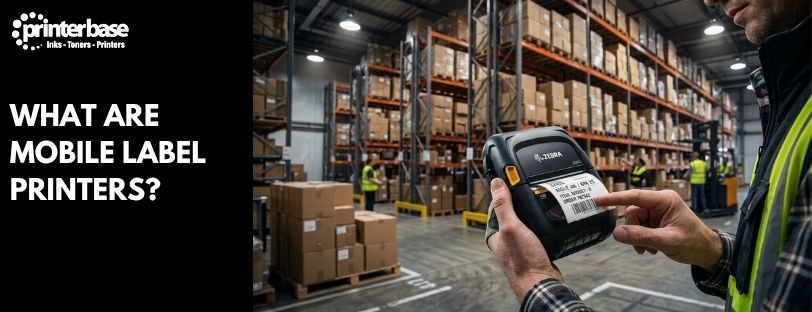
A courier reprints a smudged label without going back to the depot. A warehouse worker relabels a damaged pallet from the seat of a forklift. A market trader knocks out a fresh price tag between customers. All three are using the same category of device: a mobile label printer. It’s a compact, battery-powered printer built to produce labels wherever the work happens, not back at a desk. It has become standard kit across warehouses, courier fleets and retail counters. This guide covers what mobile label printers actually are and how they differ from handheld label makers. It also covers the technology inside them, who uses them, and the label sizes you’re likely to need.
What Is A Mobile Label Printer?
A mobile label printer is a portable, battery-powered printer that pairs with a smartphone, tablet, handheld scanner or laptop over Bluetooth or Wi-Fi and prints labels on the spot. Rather than sitting fixed on a desk or till counter, it’s built to travel with the person doing the work. It gets clipped to a belt, slung over a shoulder, or mounted in a delivery van or on a forklift.
Most mobile printers handle labels up to 4 inches wide, wide enough for a full 6×4 inch (100x150mm) shipping label. That’s the standard size used by Royal Mail, Evri, DPD and most other UK couriers. That width is the spec to check before you buy: a printer rated for narrower labels won’t produce a courier-compliant shipping label, however good everything else about it is.
Mobile Label Printers Vs Handheld Label Printers
The terms get used interchangeably, but they describe two different tools.
A mobile label printer is the larger of the two. It prints labels up to around 4 inches wide, so up to 6×4 inch. It also needs a separate device, a phone, tablet, handheld computer or desktop, to send it the label design and data over Bluetooth, Wi-Fi or USB. It’s built for jobs where the label needs to carry real information: a full delivery address, a barcode, a consignment number, a packing slip.
A handheld label printer (sometimes called a label maker) is smaller and usually self-contained, with its own keypad or touchscreen and no need to pair with anything else. It prints narrow labels, typically well under 2 inches, for jobs like cable identification, shelf-edge pricing, file labelling and name badges. It’s the tool for quick, short text labels rather than data-heavy shipping or inventory labels.
If your team is producing shipping labels, packing slips or barcoded stock labels on the move, a mobile label printer is what you want. If you need quick text labels for organising, tagging or pricing, a handheld label maker is the cheaper, simpler option.
The Technology Behind Mobile Label Printers
Connectivity And Power
Connectivity is built around mobility. Bluetooth is the most common way to pair a mobile printer with a phone, tablet or handheld scanner, with Wi-Fi and NFC also common on mid-range and premium models. Power comes from a rechargeable, often swappable, battery pack. Manufacturers usually rate battery life in labels printed per charge rather than hours, since that’s the figure that actually tells you whether it’ll last a shift.
Ruggedness
Ruggedness is the other differentiator. Warehouse and courier-focused models are tested against drops onto concrete, typically from around 2 metres. They’re rated for dust and liquid ingress under an IP rating, similar to the Zebra ZQ500 series. Healthcare settings need something different again: printers built to survive frequent disinfecting without the casing degrading.
Industries That Rely On Mobile Label Printers
Three sectors account for most mobile label printer use, and each leans on a slightly different feature set.
Warehousing And Logistics
Warehouses use mobile printers to label incoming stock and relabel damaged or unreadable barcodes without walking back to a fixed printer. They also mark pallet and shelf locations as goods move. Many are mounted directly onto forklifts, pallet trucks and picking carts with a vehicle cradle and power adapter, so the operator never has to dismount.
Courier And Delivery
Couriers and delivery drivers use mobile printers to produce consignment and shipping labels at the point of collection rather than printing everything in advance. They can also reprint a label on the spot if a barcode gets damaged or a scan fails mid-round. A van-mounted or belt-worn printer removes the need to return to a depot for something as simple as a replacement label, which matters when routes are timed tightly.
Retail
In retail, mobile printers handle shelf-edge and till-side price labelling, click-and-collect order labels, and pop-up or market-stall selling where there’s no fixed till point or mains power. A trader can print a fresh price label between customers instead of relying on stock printed the night before.
Common Label Sizes And What They’re Used For
The label size you need depends entirely on what’s going on the label. These are the sizes that come up most often:
| Label Size | Typical Use |
|---|---|
| 6 x 4 inch (100 x 150mm) | Delivery and packaging slips, shipping labels for Royal Mail, Evri, DPD and most other UK couriers |
| 4 x 2 inch or narrower rolls | Receipts and order slips |
| Roll-fed, typically 2-3 inch | Address labels |
| Small format, food-safe adhesive | Food labels, including day-dot and use-by date labels |
The 6×4 inch label deserves a special mention, because it’s the one size that matters most if you’re printing your own shipping labels. Royal Mail’s Click and Drop service, Evri, DPD and most other UK couriers have all standardised on 100x150mm. It isn’t an arbitrary choice either. The format gives enough room for a courier barcode, the delivery and return addresses, and the service type. Any tracking codes also fit, at a size that scans reliably through automated sorting equipment. If you print your own postage and shipping labels, check your label size settings carefully. Your mobile printer, its driver settings and your courier platform all need to be set to the same size. A mismatch between any of those three is the most common cause of label printing going wrong.
Receipts, address labels and food labels are typically narrower and shorter, and printed from continuous or smaller pre-cut rolls rather than the fixed 6×4 format. Food labels in particular often need a food-safe adhesive and space for a use-by or day-dot date. If the label needs to survive refrigeration or heavy handling, a synthetic label stock resists moisture and abrasion far better than plain paper.
Choosing The Right Mobile Label Printer
A few questions cut through most of the spec sheet noise:
- What size are your labels? If you need full 6×4 inch shipping labels, make sure the printer is rated for 4 inch width, not just the narrower handheld format.
- How will it connect? Check it pairs with the handheld scanners, EPOS system or courier software you already use, not just a generic phone app.
- How long does the battery last? Look at labels-per-charge rather than hours, and check whether batteries are swappable for a full shift’s use.
- How rough is the environment? A warehouse or vehicle-mounted printer needs a drop rating and an IP rating for dust and liquid; an office or till-side printer doesn’t.
- What print speed and resolution do you need? 203dpi is standard for most shipping and warehouse labels; 300dpi is worth paying for if you’re printing small barcodes or fine text.
Get these six right and you’ll end up with a printer that matches the job, rather than one that looks impressive on a spec sheet but can’t produce the label you actually need.
Conclusion
Mobile label printers exist to solve one problem. It’s about getting the right label out at the point where the work is happening, rather than sending someone back to a desk or a depot. The line between mobile and handheld printers comes down to size and capability. Mobile printers handle the wider, data-heavy 6×4 inch labels that shipping and warehouse work demands, while handheld label makers are built for short text labels rather than anything data-driven.
Match the print technology to how long the label needs to last, and check the connectivity works with the systems you already run. Don’t underestimate how much a proper drop and IP rating matters once a printer is doing a full shift on a forklift or delivery round. Once you know your label size and where the printer will actually be used, the rest gets easier. Choosing between direct thermal and thermal transfer, and between the mobile and handheld formats, follows naturally. If you’re ready to compare specific models, our team can talk you through which mobile label printer fits your setup.
Frequently Asked Questions
What Is A Mobile Label Printer Used For?
Mobile label printers are used to produce labels on the spot rather than at a fixed desk or till. Common examples are shipping and delivery labels, warehouse and stock labels, and retail price labels. They connect to a phone, tablet or handheld scanner and print wherever the person doing the work is standing.
What’s The Difference Between A Mobile And A Handheld Label Printer?
A mobile label printer prints wider labels, up to around 4 inches (6×4 inch), and pairs with a separate phone, tablet or scanner over Bluetooth or Wi-Fi. A handheld label printer is smaller and self-contained, with its own keypad, and prints narrow labels for quick text jobs like cable tags or shelf pricing.
Do Mobile Label Printers Need A Phone Or Tablet To Work?
Most do. Mobile label printers are designed to pair with a separate device over Bluetooth or Wi-Fi, which sends the label design and data across. Some models can also connect directly to a desktop PC over USB or Wi-Fi if you’re not printing on the move.
What Size Labels Can A Mobile Label Printer Print?
Most mobile label printers handle labels up to 4 inches wide. That covers the standard 6×4 inch (100x150mm) shipping label used by Royal Mail, Evri, DPD and most other UK couriers, as well as smaller receipt, address and food labels.
How Long Does A Mobile Label Printer’s Battery Last?
Manufacturers usually rate battery life by labels printed per charge rather than hours, and figures vary a lot by model and label size. Many mobile printers use swappable battery packs, so a spare battery is worth considering if the printer needs to run a full shift without a charging break.
Are Mobile Label Printers Durable Enough For Warehouses And Vehicles?
The better ones are. Warehouse and courier-focused mobile printers are typically rated for drops onto concrete from around 2 metres, and carry an IP rating for dust and liquid resistance. Vehicle mount kits let them run directly from a forklift, van or pallet truck’s power supply.
Need Help or More Information ?
If you need any further help or more information, reach out to us by leaving a comment below or through one of the many ways on our Contact Us page.
Alternatively you can contact us by Phone on 0161 308 5800 or by Live Chat on our main Website Monday to Friday and our team will be happy to help or answer with any questions you might have.
You can also find all the various ways to connect with Us at the bottom of this page. Please share this post if you found it helpful.