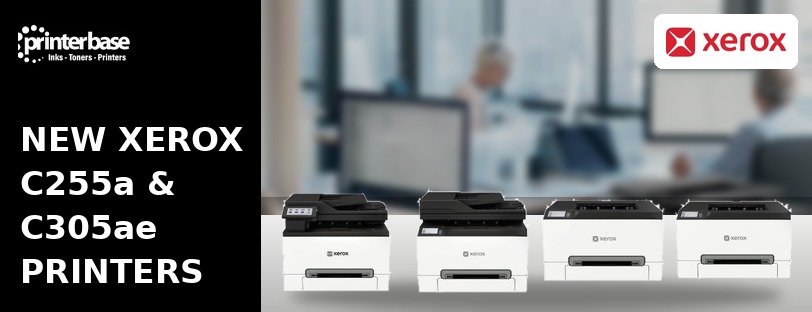
Xerox has launched four new A4 colour printers: the C240, C300, C255a and C305ae. It’s the first hardware lineup released under the newly unified Xerox brand, following the company’s integration with Lexmark, and it’s aimed squarely at small workgroups that want reliable colour printing without needing an IT department to set it up. So at Printerbase, our focus is on the two multifunction models in the range: the C255a and the C305ae.
A New Generation, Built on Two Companies’ Engineering
Xerox announced the range on 23 June 2026, calling it the first product line to combine Xerox and Lexmark engineering under one badge. Jacques-Edouard Gueden, Xerox’s chief revenue officer, described it as giving small workgroup customers “a reliable, straightforward solution built on the combined resources of both companies.” In practice, that combination shows up in the hardware: familiar Xerox styling and workflow software, paired with print engines and security architecture drawn from Lexmark’s enterprise background.
In fact, the range is already shipping in North America, Western Europe, Australia and New Zealand, and further regions will follow.
What’s Replacing What – New In, Old Out
First, the C240 will take over from the C230 and the C255a will replace the C235 eventually. Either way, the new range brings a wireless setup, a colour touchscreen, a lower running cost, combined engineering and technology from the unified Xerox brand without changing the footprint on your desk.
Xerox C255a: Reliable, Even on a Monday Morning
Xerox’s own line for the C255a is “reliable, even on a Monday morning.” Indeed, the spec sheet backs it up. In particular, it’s a compact colour multifunction printer built for small teams: print, scan, copy and fax from one device, with print and copy speeds up to 25 pages per minute in both colour and mono. In fact, time to first page is around 10.5 seconds, so there’s no long warm-up before the first job lands in the tray.
Furthermore, it runs from a 2.8-inch colour touchscreen and connects over Ethernet, USB or 802.11ac wireless, and it takes a 250-sheet standard paper tray. For instance, the in-box Return Programme cartridges cover up to 750 pages in black and 500 in colour, and high-yield options are available once you’re through the starters. In addition, Xerox backs it with a 1-year onsite repair warranty as standard, extendable to five years through the Xerox Free Extended Warranty Promotion.
Xerox C305ae: Setup & Print Without Installing a Print Driver
First, Xerox built the C305ae around a specific idea: most people shouldn’t need to install a driver to print. Indeed, it’s plug and play for many users straight out of the box, which matters more than it sounds for small offices juggling a mix of laptops, Chromebooks and the odd Windows on ARM device that traditional print drivers don’t always play nicely with.
Once it’s running, the C305ae covers print, scan, copy and fax with automatic double-sided printing and a single-pass duplex document feeder, so two-sided originals scan in one go instead of being flipped and re-fed by hand. Meanwhile, toner replacement is one-handed, the 4.3-inch touchscreen tilts to suit whoever’s standing at it, and paper capacity can be expanded with additional trays if your volumes grow. On the mobile side, printing covers AirPrint, Mopria and Chromebook devices, and it also plugs into the wider Xerox Workflow Central ecosystem for anyone automating document processes beyond basic printing.
Built With Sustainability in Mind
First, Xerox manufactures the C305ae with more than 50% post-consumer recycled plastic. It also supports toner recycling through its Cartridge Collection Programme where available. In addition, built-in power-saving modes and Xerox Earth Smart Settings help keep energy use down between jobs, while automatic double-sided printing cuts paper consumption without slowing anyone down. It also carries ENERGY STAR certification and EPEAT registration, which gives businesses independent confirmation of its efficiency credentials rather than just a marketing claim.
Security That Doesn’t Stop at the Device
Additionally, every model in the range ships with built-in security features that protect the printer itself, the documents passing through it and the network it’s connected to. Xerox has also added post-quantum cryptography support across the lineup, which is unusual at this end of the market, so it’s worth knowing about if your business has to meet forward-looking security requirements.
C230 vs C240 and C235 vs C245
| Feature | C230 (Outgoing) | C240 (New) | C235 (Outgoing) | C245 (New) |
|---|---|---|---|---|
| Function | Print only | Print only | Print, scan, copy | Print, scan, copy |
| Wireless connectivity | Yes | Yes, improved setup | Yes | Yes, improved setup |
| Touchscreen | Basic LCD | Colour touchscreen | Basic LCD | Colour touchscreen |
| Warranty | 1 year | 1 year, extendable to 5 | 1 year | 1 year, extendable to 5 |
| Post-quantum security | No | Yes | No | Yes |
In fact, every model in the new range, including the C255a and C305ae, is eligible for the Xerox Free Extended Warranty Promotion, which extends the standard 1-year cover up to 5 years with an annual purchase of a Genuine Xerox toner cartridge set.
Frequently Asked Questions
Q: What’s the difference between the Xerox C255a and the C305ae?
A: Specifically, the C255a is the compact all-rounder for small teams, printing and copying at up to 25ppm. The C305ae is built for the same job but adds driverless plug-and-play setup, a larger 4.3-inch touchscreen and expandable paper capacity, making it better suited to slightly higher volumes or offices with mixed device types.
Q: Does the Xerox C240 replace the C230?
A: Yes. Indeed, the C240 is the direct successor to the C230, with the same print-only role but wireless setup and a colour touchscreen added.
Q: Does the Xerox C245 replace the C235?
A: Indeed, the C245 takes over from the C235 as the new print, scan and copy model in the same tier.
Compatibility, Warranty and Sustainability
Q: Do I need to install a driver for the Xerox C305ae?
A: For most users, no. Indeed, Xerox designed the C305ae for plug-and-play printing without traditional driver installation, though IT teams managing larger fleets can still install drivers manually if they need specific configuration.
Q: Are the new Xerox printers compatible with Chromebooks and Windows on ARM?
A: Yes. The range supports AirPrint, Mopria and Chromebook printing, and it’s also compatible with Windows on ARM and Snapdragon-powered devices.
Q: What warranty comes with the Xerox C255a and C305ae?
A: Both come with a 1-year Xerox warranty as standard. In addition, it’s extendable up to 5 years through the Xerox Free Extended Warranty Promotion.
Q: Is the Xerox C305ae a good choice for a sustainability-focused office?
A: Yes. In fact, it’s built with over 50% post-consumer recycled plastic, is ENERGY STAR certified and EPEAT registered, and includes Earth Smart Settings to reduce energy use.
Ready to Choose Your Xerox Printer?
Ready to see the range for yourself? View the Xerox C255a and Xerox C305ae product pages, or otherwise browse the Xerox C240 and Xerox C300 if you need a print-only model. Of course, our sales team can talk through which one fits your volumes on 0161 308 5800.
Need Help or More Information ?
Otherwise, if you’re not sure which model suits your printing volumes, get in touch. Alternatively, visit our Contact Us page, call us on 0161 308 5800, or use Live Chat on the site and one of the team will help you choose.