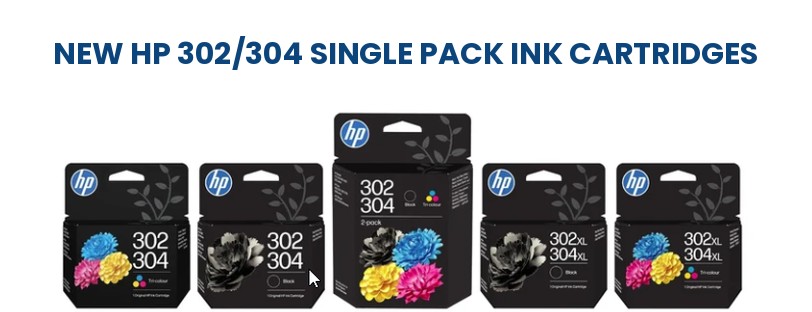
HP will soon stop selling the individual HP 302 and HP 304 ink cartridges as separate cartridges. As a result, the HP 302/304 Ink Cartridge Combo Packs replace the separate HP 302 and HP 304 ranges as a combined cartridge pack (HP 302/404). Compatibility remains the same with HP DeskJet, OfficeJet and ENVY printers that used either of the original cartridges.
If you’ve ever stood in front of a shelf, or a website, trying to work out whether your DeskJet takes a 302 or a 304, that guesswork is going away. Suited to home, school, or office use, the HP 302/304 range will produce sharp text and accurate colour photos print after print. Genuine HP cartridges are formulated for fade resistance, so prints hold up well over time.
Why HP Has Combined the Two Individual Cartridges?
HP 302 and HP 304 cartridges have always used identical ink and near-identical cartridge designs, but they served different printer families. As a result, that split caused a genuine problem at the point of purchase: customers picking the wrong number, ordering the wrong cartridge, and sending it back. So HP’s fix is to combine both part numbers into one SKU that covers the printers either range used to serve.
The ink itself hasn’t changed, so print quality is the same either way. What has change is the page yields, because one cartridge now replaces two that didn’t always hold the same amount of ink. We’ve broken down exactly what that means below.
The New Part Numbers
Five new SKUs replace the old 302 and 304 listings. XL versions, for example, carry more ink and print more pages before you need to replace them, which suits anyone printing daily rather than occasionally.
| Part Number | Product Description |
|---|---|
| B7RT6AE | HP 302/304 Tri-colour Original Ink Cartridge |
| B7RT7AE | HP 302/304 Black Original Ink Cartridge |
| B7RT8AE | HP 302XL/304XL Tri-colour Original Ink Cartridge |
| B7RT9AE | HP 302XL/304XL Black Original Ink Cartridge |
| B82L1AE | HP 302/304 Tri-colour/Black Original Ink Cartridge 2-Pack |
Have The Ink Cartridge Capacities/ Page Yields Changed?
The new cartridge merges two ranges that used to have different yields. Depending on which cartridge you’re switching from, the number on the box may go up, down, or stay the same. So here’s the full picture.
| Old Part No. | Old Cartridge | Old Yield | New Part No. | New Cartridge | New Yield |
|---|---|---|---|---|---|
| F6U66AE | 302 Black | 170 pages | B7RT7AE | 302/304 Black | 120 pages |
| N9K06AE | 304 Black | 100 pages | B7RT7AE | 302/304 Black | 120 pages |
| F6U65AE | 302 Tri-colour | 150 pages | B7RT6AE | 302/304 Tri-colour | 100 pages |
| N9K05AE | 304 Tri-colour | 120 pages | B7RT6AE | 302/304 Tri-colour | 100 pages |
| F6U68AE | 302XL Black | 430 pages | B7RT9AE | 302XL/304XL Black | 300 pages |
| N9K08AE | 304XL Black | 300 pages | B7RT9AE | 302XL/304XL Black | 300 pages |
| F6U67AE | 302XL Tri-colour | 300 pages | B7RT8AE | 302XL/304XL Tri-colour | 300 pages |
| N9K07AE | 304XL Tri-colour | 300 pages | B7RT8AE | 302XL/304XL Tri-colour | 300 pages |
| 3JB05AE | 304 Black & Tri-colour Pack | Black: 120 pages, Tri-colour: 100 pages | B82L1AE | 302/304 Tri-colour + Black Pack | Black: 120 pages, Tri-colour: 100 pages |
Worth knowing: if you’re currently using a standard HP 302 Black cartridge, the new 302/304 Black holds less ink: 120 pages against 170. However, HP 302XL Black users see an even bigger drop, from 430 pages down to 300. Switching from HP 304 Black actually gets you more pages (120 against 100), while the 304 tri-colour yield drops slightly. XL tri-colour and XL black yields stay the same at 300 pages if you’re coming from HP 304XL. None of this affects print quality, just how many pages you’ll get before the next replacement.
Which HP Printers Are Compatible With the New Cartridge?
As a rule of thumb, if your printer currently takes an HP 302 or HP 304 cartridge, it will take the new HP 302/304 cartridge too, so there’s no need to double-check against a separate list. HP lists the following models as compatible.
| Printer Family | Models |
|---|---|
| HP DeskJet | 1110, 2130, 2132, 2134, 2136, 2620, 2622, 2630, 2632, 2633, 2634, 3630, 3634, 3635, 3639, 3720, 3730, 3732, 3733, 3735, 3750, 3760, 3762, 3764 |
| HP OfficeJet | 3830, 3831, 3832, 3833, 3834, 3835, 4650, 4652, 4655, 4658, 5220, 5230, 5232 |
| HP ENVY | 4520, 4522, 4524, 4526, 4527, 4528, 5010, 5020, 5030, 5032, 5050 |
| HP AMP | 130 |
Not sure which cartridge your printer needs? Check your existing cartridge’s part number or the printer’s manual, or get in touch and we’ll confirm it for you.
What This Means if You’ve Already Got HP 302 or HP 304 Cartridges
Nothing, for now. Existing HP 302 and HP 304 stock will keep working exactly as before, and HP is phasing the old ranges out gradually through 2026 rather than pulling them overnight. So there’s no need to rush out and buy the new version, and no printer settings or drivers to update when you do switch over.
Standard or XL Ink Cartridges: Which One Should You Buy?
Standard cartridges suit light or occasional printing. XL cartridges hold more ink and cost less per page, which makes them the better choice if you’re printing regularly or in an office rather than at home. So if you’re not sure, go XL: you’ll replace cartridges less often and get better value over time.
Frequently Asked Questions
Is HP 302/304 the Same as HP 302 or HP 304?
It’s a new, unified cartridge built to replace both. It uses the same ink and works with the same printers, so the only real difference is the label.
Is HP 302/304 Better Than HP 302 or HP 304?
No, and HP isn’t claiming otherwise. In short, it’s the same quality and performance, just simpler to buy. The XL versions print more pages than standard, but that was already true before the rebrand.
Why Does the Packaging Show Both 302 and 304?
The dual label tells you at a glance that the cartridge fits printers that used to take either number, so you don’t need to know your printer’s exact cartridge type before you buy.
Will HP 302 and HP 304 Cartridges Still Be Sold?
They’re being phased out gradually over 2026 as the new 302/304 range rolls out, rather than disappearing all at once.
Do I Need to Switch to HP 302/304 Right Away?
No. Your current HP 302 or HP 304 cartridges will carry on working as normal, so you can move to the new range whenever your printer next needs a refill.
What Does “XL” Mean on an HP 302XL/304XL Cartridge?
XL cartridges hold more ink than standard ones, so they print more pages before running out. They’re worth it if you print often.
Which Printers Work With the HP 302/304 Cartridge?
A wide range of HP DeskJet, ENVY and OfficeJet models. For the full list, see the compatibility table above, or check your printer’s documentation if your model isn’t listed.
How Many Pages Can I Print With the HP 302/304 Cartridges?
It depends on which cartridge you buy. The standard HP 302/304 Black (B7RT7AE) prints up to 120 pages, and the standard Tri-colour (B7RT6AE) prints up to 100 pages. Go XL and the HP 302XL/304XL Black (B7RT9AE) and Tri-colour (B7RT8AE) both print up to 300 pages. Check the full yield comparison table above if you’re switching from an older HP 302 or HP 304 cartridge and want to see exactly how the numbers compare.
Need Help or More Information ?
If you need any further help or more information, reach out to us by leaving a comment below or through one of the many ways on our Contact Us page.
Alternatively you can contact us by Phone on 0161 308 5800 or by Live Chat on our main Website Monday to Friday and our team will be happy to help or answer with any questions you might have.
You can also find all the various ways to connect with Us at the bottom of this page. Please share this post if you found it helpful.