

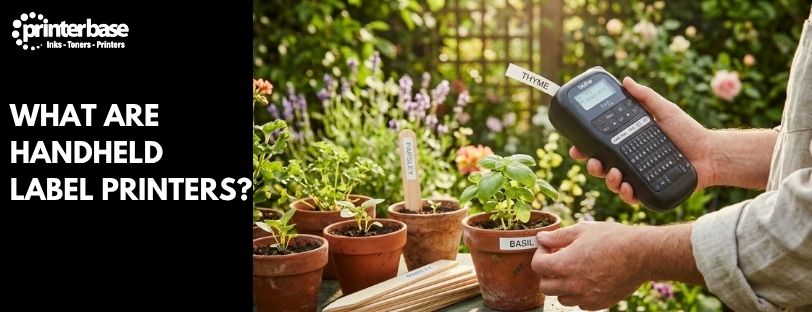
Pick up almost any labelled cable, patch panel, plant pot or lab sample in the UK and there’s a good chance it came off a handheld label printer. These small, pocket-sized machines have quietly become standard kit for electricians, IT engineers, lab technicians and gardeners alike, yet most people have never really thought about what makes them different from the bigger printers used in warehouses and shops.
This guide explains what handheld label printers actually are, how they differ from mobile label printers, the print technology behind them, who uses them and for what, and the label sizes you’ll come across when choosing one.
What Is A Handheld Label Printer?
Handheld label printers are small, self-contained machines you hold in one hand and type on directly. Most have a built-in keyboard, a small LCD screen and a compartment for a roll or cassette of label tape, so you can design and print a label on the spot without connecting to a computer or phone. Brother’s P-touch range and similar Dymo and Epson machines are the models most people picture: compact, battery or mains-powered, and built to print narrow tape rather than sheet labels.
That self-contained design is the whole point. An office worker labelling a shelf of lever-arch files, an electrician marking up a consumer unit, or a gardener tagging a row of seedlings doesn’t want to open a laptop first. They want to type a word, press print, and stick the label down.
Handheld Vs Mobile Label Printers: What’s The Difference?
“Handheld” and “mobile” label printers get used interchangeably online, but they’re built for different jobs. A handheld label printer, like a Brother P-touch, has its own keyboard and screen. You compose the label on the device itself, and it prints relatively thin tape, typically 6mm to 36mm wide, on small cassettes designed for text, symbols and short barcodes.
A mobile label printer, such as a Zebra ZQ series or Brother RuggedJet device, has no keyboard at all. It’s a print engine only, paired over Bluetooth or Wi-Fi to a phone, tablet or handheld scanner, and it prints wider labels, often 2 to 4 inches, straight from a warehouse management system, EPOS till or courier app. Mobile printers are built for volume: shipping labels, price tags, receipts, one after another, all day.
In short, a handheld printer is a standalone typewriter-style labeller for narrow tape, while a mobile printer is a wireless accessory for high-volume, wider-format labels. If you’re weighing up which one fits a warehouse or retail operation rather than a desk or toolbox, read our table below:
| Feature | Handheld Label Printer | Mobile Label Printer |
|---|---|---|
| Keyboard/Screen | Built into the device | None, controlled from a paired phone or scanner |
| Typical Label Width | 6mm to 36mm tape | 2 to 4 inch labels |
| Typical User | Electricians, IT staff, office admin, gardeners, home users | Warehouse, retail and delivery staff |
| Typical Volume | Low, one-off or small-batch labels | High, continuous scan-and-print runs |
| Connects To | Nothing, or a phone app for templates | WMS, EPOS or courier software via Bluetooth/Wi-Fi |
What Print Technology Do Handheld Label Printers Use?
Nearly all handheld label printers use thermal printing rather than ink or toner, which is why they have no cartridges to replace. There are two versions of this worth knowing before you buy.
Direct thermal printing uses a heat-sensitive tape. The print head heats specific points on the tape as it feeds through, and those points darken to form the text. It’s simple, cheap to run and needs no ribbon, but direct thermal labels fade over time if they’re left in direct sunlight or somewhere hot, so it suits short-term labels like temporary tags or general office use.
Thermal transfer printing melts a thin ink ribbon onto ordinary tape instead of heating the tape itself. It costs slightly more per label because you’re buying a ribbon as well as tape, but the result resists water, chemicals, abrasion and UV light far better. Most of Brother’s laminated TZe tape cassettes, the ones recommended for electricians and outdoor labelling, work this way.
Resolution matters too, though most handheld machines don’t advertise it loudly. Around 180 to 200 dpi is standard and fine for text and simple symbols. If you need small barcodes or dense technical text, look for a model that specifies a higher resolution, since low-dpi barcodes can end up too blurry for a scanner to read reliably.
Common Label Sizes And Tape Widths
Handheld printers work from narrow tape cassettes rather than sheet labels, and the width you need depends entirely on what you’re labelling. Here’s how the common widths break down in practice.
| Tape Width | Typical Use |
|---|---|
| 6mm to 9mm | Cable wraps, small component labels, jewellery-style name tags |
| 12mm | The most common general-purpose width: stationery, filing, kitchen jars, plant labels |
| 18mm to 24mm | Patch panels, consumer units, larger asset tags, warning labels |
| 36mm and above | Shelf and bin labels, wide warning signage, lever-arch file spines |
As a rule of thumb, buy a printer that supports at least one width wider than you think you need. Cable and part identification labels in particular often need to wrap around something, and a slightly wider label gives the text room to stay legible once it’s curled around a cable or bracket.
Which Industries Use Handheld Label Printers?
Handheld label printers turn up in more workplaces than most people expect, precisely because they’re cheap, portable and need no setup. The main users are:
- Laboratories. Sample vials, slides and storage boxes need clear, chemical-resistant labels printed on demand, often with a date or reference code that changes every few minutes.
- Electricians and IT staff. Consumer units, patch panels, network cabinets and individual cables all need to be identified for safety and compliance, usually with heat-shrink or self-laminating tape that survives heat and handling.
- Office administrators. Filing systems, shelving, name badges and stationery all get labelled faster with a handheld printer than a sheet-fed desktop one, especially for short, one-off runs.
- Gardeners and allotment holders. Weatherproof tape on plant pots and sticks survives rain and sun far better than a handwritten wooden marker, and keeps track of sowing dates and varieties.
- Home users. Organising kitchen jars, children’s belongings, cables behind the TV and storage boxes are the most common domestic uses.
What Do People Actually Label With A Handheld Printer?
The industries above map onto a fairly consistent list of everyday jobs:
- Garden labels. Plant names, sowing dates and care notes on pots, seed trays and plant sticks, usually on 12mm laminated tape that won’t wash off in the rain.
- Stationery and filing labels. Ring binders, box files, shelving and storage tubs in offices and home offices.
- Naming tags. School uniforms, PE kit, lunchboxes and personal belongings, typically on iron-on or fabric tape.
- Cable and part identification. Network cables, power leads, circuit breakers and spare parts, where a wraparound or heat-shrink label needs to stay legible for years, not weeks.
Our own guide to garden labelling goes into more detail on choosing tape and wording for plant labels specifically.
Choosing The Right Handheld Label Printer
Once you know roughly what you’ll be labelling, narrowing down a model comes down to a handful of practical questions.
Keyboard layout. Some handheld printers use an ABC keyboard, others a full QWERTY layout. If you’ll be typing longer labels regularly, a QWERTY model is faster to use, though ABC layouts are common on cheaper, occasional-use machines.
Maximum tape width. Check the widest tape the printer accepts, not just the width you use most often. A printer that tops out at 12mm won’t help if you later need a 24mm warning label.
Tape type support. Confirm it takes laminated tape if labels will be outdoors or handled a lot, and heat-shrink tape if you need to label round cables rather than flat surfaces.
App and template support. Many current models pair with a free phone app for pre-built templates, symbols and barcodes, which speeds up repetitive labelling jobs like patch panels or lab samples considerably.
Power source. Rechargeable battery models are more convenient for fieldwork and electrical jobs; mains-only models are fine for a desk that never moves.
Auto-cutters, symbol libraries and headline connectivity features all matter less than getting the width, tape type and keyboard right for the job in hand. Buy for the labels you’ll actually print, not the longest spec sheet.
Conclusion
Handheld label printers earn their keep by doing one thing well: turning a short piece of text into a durable, legible label in seconds, wherever you happen to be standing. They’re not built to compete with mobile printers on volume, and they’re not trying to. If your day involves the odd cable, plant pot, file or consumer unit rather than pallet after pallet of shipping labels, a handheld printer is almost certainly the right tool, not a mobile one.
Start by working out your widest label need and whether it will live indoors or out, since that decides tape width and whether you need laminated or heat-shrink stock. From there, a QWERTY keyboard and app support are the upgrades most worth paying for if you’ll be labelling regularly rather than occasionally.
Frequently Asked Questions
What is the difference between a handheld and a mobile label printer?
A handheld label printer has its own keyboard and screen and prints narrow tape, usually 6mm to 36mm wide, directly from the device. A mobile label printer has no keyboard at all and is paired wirelessly to a phone, tablet or scanner, printing wider labels for high-volume jobs like shipping and retail pricing.
Do handheld label printers need a computer to work?
No. Most handheld label printers are fully standalone, with a built-in keyboard and small screen for typing and previewing the label before printing. Some models also support a companion app for extra templates and symbols, but this is optional rather than required.
What tape width should I buy for general use?
12mm is the most common general-purpose width and suits stationery, filing, kitchen and garden labels. If you regularly label patch panels, consumer units or wider warning signs, look for a printer that also supports 18mm to 24mm tape.
Is direct thermal or thermal transfer better for handheld labels?
It depends on where the label will end up. Direct thermal is cheaper and fine for short-term, indoor labels, but fades in sunlight or heat over time. Thermal transfer, used in most laminated tape cassettes, costs a little more but resists water, chemicals and UV light, making it the better choice for outdoor, electrical or long-term labels.
Can handheld label printers print barcodes?
Many can print simple linear barcodes and QR codes, particularly models aimed at lab or IT use. For barcodes that need to be scanned reliably, check the printer’s resolution, since low-dpi handheld models can produce codes too blurry to read.
What industries use handheld label printers the most?
Laboratories, electricians, IT staff and office administrators are the most consistent users, relying on them for sample labelling, cable and consumer unit identification, and general filing. Gardeners and home users make up a large share of domestic sales too, mainly for plant labels and household organisation.
How long do handheld printer labels last?
It depends on the tape and conditions. Laminated, thermal transfer tape kept indoors can last for years without fading. Direct thermal labels left in direct sunlight or a hot environment, such as a car or greenhouse, can start to fade within weeks or months.
Need Help or More Information ?
If you need any further help or more information, reach out to us by leaving a comment below or through one of the many ways on our Contact Us page.
Alternatively you can contact us by Phone on 0161 308 5800 or by Live Chat on our main Website Monday to Friday and our team will be happy to help or answer with any questions you might have.
You can also find all the various ways to connect with Us at the bottom of this page. Please share this post if you found it helpful.