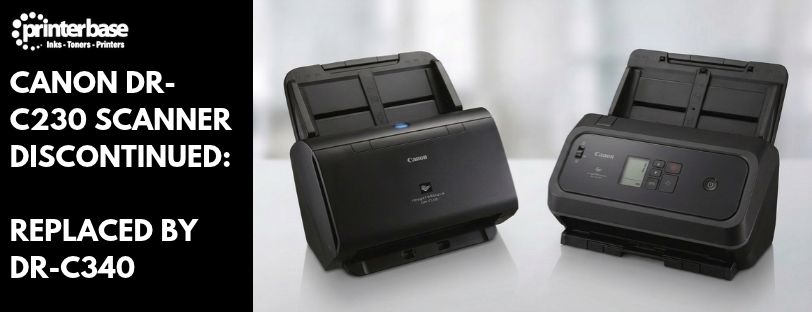
Canon has discontinued the imageFORMULA DR-C230, the compact desktop document scanner that has sat on reception desks, in HR offices and in records rooms across the UK for years. If you run one, it will keep working. However, you won’t be able to buy it new for much longer.
The good news is that Canon has a direct replacement ready to go: the Canon imageFORMULA DR-C340. In fact, it takes up roughly the same desk space as the DR-C230, but it scans faster, holds more paper and copes with a wider range of documents. Below, we cover what’s changed, how the two scanners compare, and whether the upgrade makes sense for you.
Canon imageFORMULA DR-C340
Key Differences
- DR-C340 Scans Faster: 40ppm / 80ipm vs 30ppm / 60ipm
- DR-C340 Has A 100-Sheet Feeder (DR-C230: 60 Sheets)
- DR-C340 Handles Up To 7,000 Scans A Day (DR-C230: 3,500)
- DR-C340 Connects Via USB-C (USB 3.2) Instead Of USB 2.0
- DR-C340 Scans Passports Without A Carrier Sheet
- DR-C340 Comes With CaptureOnTouch Pro For OCR And Barcode Reading
- DR-C340 Uses Less Power In Use And In Sleep Mode
The Canon imageFORMULA DR-C340 is the natural next step for anyone moving on from a DR-C230. It’s still a compact, double-sided, sheet-fed desktop scanner with one-touch job buttons, so day-to-day use will feel familiar from the first scan.
Where it really pulls ahead, though, is capacity. It scans at up to 40 pages per minute, or 80 images per minute in duplex, and the 100-sheet feeder means you can load a thick stack and leave it to run. As a result, Canon rates it for 4,500 to 7,000 scans a day, double what the DR-C230 was built for, which suits offices whose scanning load has grown since they bought their last scanner.
In addition, it handles more types of paper. The DR-C340 takes media from 27 to 413 g/m², long documents up to 6,096mm, plastic and embossed ID cards, and passports up to 4mm thick without a carrier sheet. Meanwhile, ultrasonic double feed detection, with a Double Feed Release function, gets you scanning again quickly if two sheets go through together.
Software gets an upgrade too. CaptureOnTouch Pro is bundled in the box and adds OCR, barcode and 2D code recognition, plus output straight to searchable PDF, Word, Excel and PowerPoint. For instance, if you use your scanner with document management software, the ISIS and TWAIN drivers are still included. Our guide to TWAIN scanners explains what that means in practice.
Canon DR-C230 vs DR-C340: Quick Comparison
Here’s how the two scanners compare on the specifications that matter most, based on Canon’s official data sheets for the DR-C230 and the DR-C340.
| Specification | Canon DR-C230 | Canon DR-C340 |
|---|---|---|
| Scan Speed | 30ppm / 60ipm | 40ppm / 80ipm |
| Feeder Capacity | 60 sheets | 100 sheets |
| Daily Volume | 3,500 scans | 4,500 to 7,000 scans |
| Max Output Resolution | 600dpi | 1200dpi |
| Paper Weight | 27 to 209 g/m² | 27 to 413 g/m² |
| Long Document Mode | Up to 3,000mm | Up to 6,096mm |
| Passport Scanning | With carrier sheet | Up to 4mm without carrier sheet |
| Interface | USB 2.0 | USB 3.2 (Type-C) |
| Bundled Software | CaptureOnTouch, CapturePerfect | CaptureOnTouch Pro |
| Power (Scanning / Sleep) | 19W / 1.4W | 15.6W / 0.6W |
Verdict
The DR-C230 was a dependable desktop scanner, and losing it isn’t a step backwards. The DR-C340 does everything the DR-C230 did, then adds more speed, a bigger feeder and a higher daily rating on top. On top of that, thicker media, long documents and passports are all easier to handle, and the bundled CaptureOnTouch Pro software turns scans into searchable, editable files without paying for extra tools. Better still, it uses less power while doing it. If your DR-C230 is still working well, there’s no rush to replace it. However, when it does come time to change, or if you need a second scanner for another desk, the DR-C340 is the one to choose. Similarly, for teams scanning several thousand pages a day, the faster DR-C350 is also worth a look.
If you’d like to compare it with the rest of the range first, you can browse all Canon scanners, or see our round-up of top Canon scanners for schools, healthcare and the public sector.
Frequently Asked Questions
Has The Canon imageFORMULA DR-C230 Been Discontinued?
Yes. Canon has discontinued the imageFORMULA DR-C230, and the imageFORMULA DR-C340 is its direct replacement.
What Replaces The Canon DR-C230?
The Canon imageFORMULA DR-C340. It scans at 40ppm / 80ipm, has a 100-sheet feeder and connects over USB 3.2 with a Type-C connector.
Will My DR-C230 Stop Working Now It’s Discontinued?
No. A discontinued scanner keeps working as normal. Furthermore, replacement rollers and support usually stay available for a while after a model reaches end of life, although stock will reduce over time.
How Much Faster Is The DR-C340 Than The DR-C230?
The DR-C340 scans at up to 40ppm / 80ipm, compared with 30ppm / 60ipm on the DR-C230. In other words, it’s around a third faster.
Can The Canon DR-C340 Scan Passports And ID Cards?
Yes. It scans passports up to 4mm thick without a carrier sheet, or up to 6mm with the optional passport carrier sheet. In addition, plastic cards, embossed cards and business cards are supported.
What Is The Difference Between The Canon DR-C340 And DR-C350?
Both share the same design, 100-sheet feeder and features. The DR-C350 is faster, scanning at 50ppm / 100ipm compared with 40ppm / 80ipm on the DR-C340.
Need Help or More Information ?
If you need any further help or more information, reach out to us by leaving a comment below or through one of the many ways on our Contact Us page.
Alternatively you can contact us by Phone on 0161 308 5800 or by Live Chat on our main Website Monday to Friday and our team will be happy to help or answer with any questions you might have.
You can also find all the various ways to connect with Us at the bottom of this page. Please share this post if you found it helpful.