

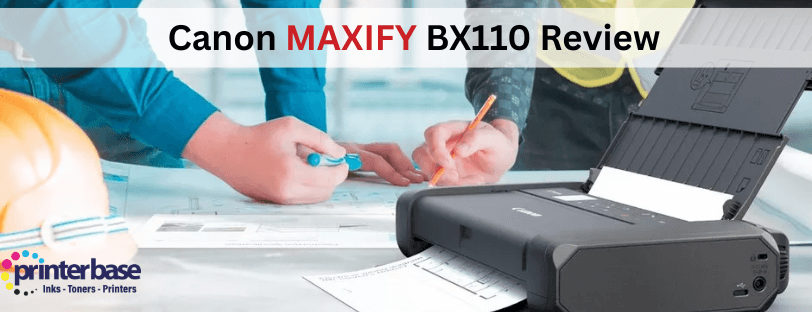
If you have ever tried to print an important document in a coffee shop, meeting room, on the road or in a temporary office, you will know that portable printers are very special kind of lifesaver. Canon has dominated this corner of the printer market for years and the new Canon MAXIFY BX110 steps in as the successor to the much loved Canon PIXMA TR150.
In this post, we will look at what has changed, how it performs in the real world and who this printer is for
Canon MAXIFY BX110 At A Glance
The Canon MAXIFY BX110 is a portable A4 colour inkjet printer with battery and uses two ink cartridges, colour and black. Designed for people who need professional looking prints away from their traditional desk setup. The main details are:
- Print speeds up to 9ipm in mono and 5.5ipm in colour
- A rechargeable battery included as standard, with up to 330 pages per charge
- USB-C charging, so you can top up from a laptop, phone charger or power bank
- WiFi, WiFi Direct and USB connectivity, plus Canon PRINT app, Apple Airprint and Mopia support for easy mobile printing
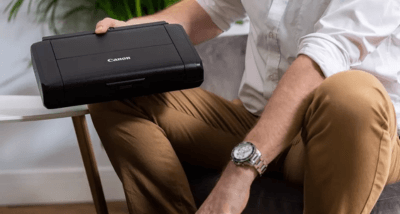
- Small and lightweight body that easily fits inside a backpack
- Improved wireless security and connectivity, compared to the Canon PIXMA TR150
On paper, it ticks all the boxes that mobile workers, freelancers and students usually care about. The real question is how it feels to use day-to-day.
Design and Portability
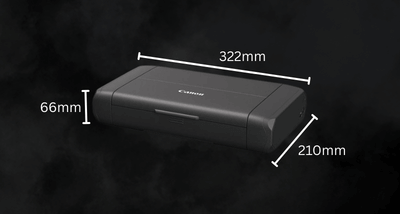
The first impression of the Canon MAXIFY BX110 is that it looks and feels like a serious printer, but not an awkward one. Canon has kept the footprint small and lines clean so it sits perfectly on a windowsill, shelving unit or side table. It’s also small enough to slide into a backpack alongside a laptop or tablet, which is exactly what most people would be using this printer for.
A few real world design touches make a difference
- The external battery clips neatly into place and can be removed if you’re working at a fixed desk with mains power.
- The paper feed folds away, so there’s no trays sticking out when travelling.
- The controls and screen are designed to be clear, even when you are using the printer on the back seat of a car, or makeshift office.
Compared with the PIXMA TR150, the MAXIFY branding makes the intent clearer. This is a portable printer for work first, but it will still print your photo’s or tickets without any issues
Connectivity and Improved Wireless Security
Connectivity is the area where the MAXIFY BX110 clearly moves on from the PIXMA TR150. Canon has focused on making it easier to get connected quickly while also tightening up the security options for business users. The printer now includes multi level protection with WPA3 WiFi security and strong TLS1.3 encryption support, which helps keep your data safer whether you are printing at home, in an office or on the road.
The new Canon BX110 includes WiFi and WiFi Direct for printing on or off your home or office network, along with USB C connectivity for plugging into a laptop or PC or simply topping up the battery. It also supports the Canon PRINT app, Apple AirPrint for Apple devices and Mopria Print Service for Android, making mobile printing feel much more effortless.
Realistically, these features mean:
- You can join an office or home WiFi network in the usual way, then print from laptops, phones and tablets.
- If you’re on-site with unsafe WiFi, WiFi Direct lets the printer create its own private connection so only you and your trusted devices can see it.
- USB-C charging keeps things simple. One charger can power your laptop, phone and printer
Print Quality Performance In Everyday Use
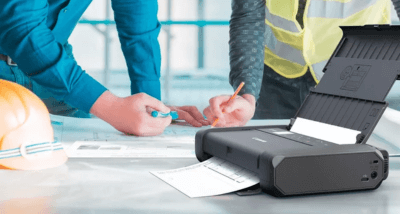
Internally, the Canon MAXIFY BX110 is very similar the older mobile inkjet printers. it prints sharp text, offers great colour reproduction and fantastic photo print quality for such a small printer
Text and Business Documents
For contracts, invoices, job sheets and forms, the Canon BX110 produces crisp, readable text that looks professional enough to hand to a client. The 9ipm mono print speed is never going to rival a laser printer, but it is perfectly acceptable for a tiny printer, running on a battery.
Colour Documents and Photo’s
Colour graphics, diagrams and charts come out clean and punchy. For project proposals or handouts with logos and coloured headings, the results look good. Photo printing is not the main purpose here, but if you occasionally want to print out a borderless A4 image for a presentation, or display, the BX110 can handle it.
Battery Life and Print Volume
The quoted 330 pages per charge will depend on what you are printing, but it gives a good idea. If you mainly print short, text heavy documents and connect to a laptop via USB, you should comfortably get through a day or two on the road before needing to recharge.
Connectivity and Improved Wireless Security
Connectivity is the area where the MAXIFY BX110 clearly moves on the from the PIXMA TR150. Canon has focused on making it easier to get connected quickly while also tightening up the security options for business users.
The new Canon BX110 includes WiFi and WiFi Direct for printing on or off your home network and USB-C connecivity for connecting to a laptop/PC or charging alongside support for the Canon PRINT app, Apple AirPrint for Apple and Mopria Print Service for Android.
Realistically, these features mean:
- You can join an office or home WiFi network in the usual way, then print from laptops, phones and tablets.
- If you’re on-site with unsafe WiFi, WiFi Direct lets the printer create its own private connection so only you and your trusted devices can see it.
- USB-C charging keeps things simple. One charger can power your laptop, phone and printer
Canon MAXIFY BX110 Vs. Canon PIXMA TR150
Many users would wonder “Is the Canon MAXIFY BX110 worth upgrading from the TR150?” With some helpful updates and improved wireless security, frequent travellers may find it a worthwhile upgrade. Read our Canon PIXMA TR150 Replacement: Canon MAXIFY BX110 blog post and see for yourself.
Verdict
The Canon MAXIFY BX110 is not trying to be the fastest or cheapest printer on the market. Instead, it focuses on something very specific. making it easy to print where normal printers simply cannot go. With its compact design, included battery, USB C charging and improved wireless features, it is a strong evolution of Canon’s mobile printing line and a worthy replacement for the PIXMA TR150.
If you regularly find yourself needing to print in cars, client offices, temporary workspaces or very small home setups, the BX110 can remove a surprising amount of stress from your day.
Need Help or More Information ?
If you need any further help or more information, reach out to us by leaving a comment below or through one of the many ways on our Contact Us page.
Alternatively you can contact us by Phone on 0800 170 7234 and 0161 308 5800 or by Live Chat on our main Website Monday to Friday and our team will be happy to help or answer with any questions you might have.
You can also find all the various ways to connect with Us at the bottom of this page. Please share this post if you found it helpful.
