

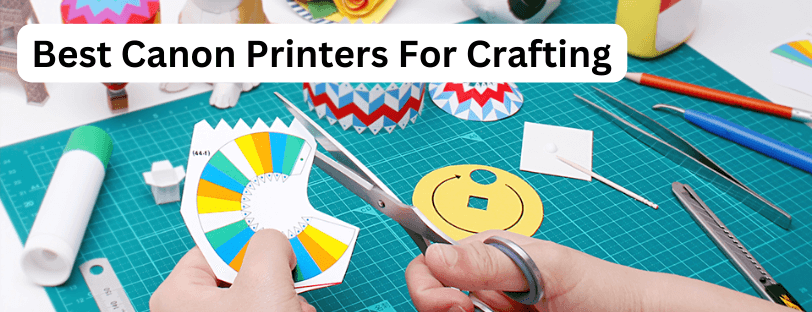
With the rise of Etsy, Pinterest and Not On The High Street, more and more people are unleashing their creativity in crafting. Whether it’s designing your own Greetings Cards, selling digital artwork and stickers or even making fun family-friendly games at home. Printing is a vital part of bringing these projects to life. Canon stands at the forefront with a range of crafting and artwork printers.
This post will explain what to look out for when choosing a crafting printer, provide practical tips and share some of our top Canon recommendations. Read our other blog, the best printers for card printing, which includes Canon printers.
What To Look For In A Crafting Printer
Finding a crafting printer isn’t as straightforward as getting one to cover all grounds. Usually, crafting requires a high GSM support, we recommend something capable of 300gsm. A few more things to look out for are the printer sizes, amount of inks taken and the Dots-Per-Inch (DPI).
Finding the right crafting printer isn’t as simple as choosing one for general home of office use. Craft projects often require specific capabilities to handle thick paper, vibrant colours and precise printing.
These are the key factors to consider:
- Paper Weight (GSM): Most crafting projects use heavier paper or cardstock. We recommend a printer that can handle up to 300gsm (Or more, for high-end art prints)
- Paper Size and Feed: Look for printers that support A4 and A3 sizes, as well as rear or multipurpose feed trays to handle thick media without jams.
- Ink Quality and Colour System: Multiple inks (5+ colour systems, or dye-based inks) will give vibrant and accurate colour reproduction.
- Print Resolution (DPI): Higher DPI ensures crisp details, essential for cards, stickers and intricate designs.
- Running Costs: For high-volume crafters, low running costs are important, especially when printing full-size templates, posters or art prints.
Crafting Use Cases
These are some of the ways different printers can fit into common crafting projects:
| Craft Project | Printer Features Needed | Notes |
|---|---|---|
| Greeting Cards | Heavy cardstock support (200–300 gsm), vibrant colours, borderless printing | A4 or A3 printers with multipurpose feed help prevent jams |
| Stickers & Labels | High resolution, ink suitable for vinyl/sticker sheets | Test a single sheet first for smudge-free results |
| Scrapbooking & Art Prints | Large size support (A3), high DPI, thick paper | Borderless printing ensures full-bleed photos or art |
| Small Business Prints | Low running costs, multiple inks, high colour accuracy | MegaTank printers reduce cost per page for bulk printing |
Best Canon Crafting Printers
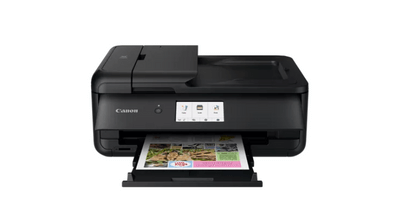
Canon PIXMA TS9550a
The Canon PIXMA TS9550a is a hybrid home-office and crafting printer. With a small A4 footprint but supports A3 printing and card up to 300gsm.
Key Features:
- 50 Sheet A3 Rear Feed
- A3 Printer With A4 Footprint
- Suitable For Crafts Or Documents
- 5 Ink System
- Print Up To 300gsm
Pros:
- Prints A3 and handles up to 300gsm with ease
- Small size
- High-quality colour printing and scanning
Cons:
- Ink costs can be high when printing A3
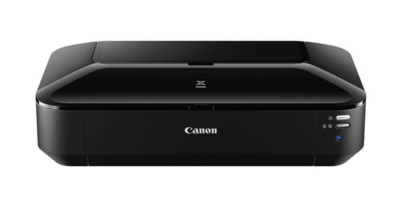
Canon PIXMA IX6850
The Printerbase long-reigning top-selling printer, the Canon PIXMA IX6850 is built with card printing in mind. Simple to use with brilliant print quality. This A3 printers is known as an affordable, entry-level printer in the card-printing industry.
Key Features
- Print card up to 300gsm
- Vibrant colour reproduction
- Simple to use
Pros
- Budget-friendly for growing hobbyists
- Reliable colour output
- Print up to A3
Cons
- Slow print speed
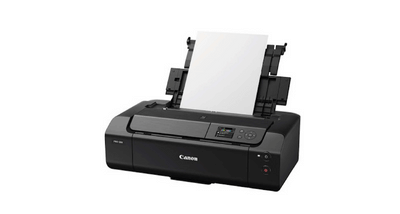
Canon PIXMA Pro-200s
What about those with an already established crafting business? There are higher-end printers available for crafting and artistic prints too. The Canon PIXMA Pro-200s is a brilliant printer for aspiring photographers or budding artists looking to sell their prints.
Key Features:
- Print Cardstock Up To 380gsm
- 8 Dye-Based Inks
- Wide Range Of Media Support
Pros
- Ideal for high-quality art prints and professional cards
- Handles thicker paper than most home printers
- Excellent colour range
Cons
- Expensive to buy
- Larger size
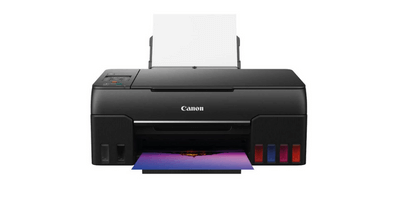
Canon PIXMA G650
The PIXMA G650 is perfect for a home with a large volume of printing needs. Crafting can get expensive on the running costs, especially when doing full-size borderless prints for paper crafting templates or board games.
Key Features:
- Low running costs
- 6 dye-based inks
- High colour accuracy
Pros:
- Cost-effective for bulk printing
- Supports a range of crafting media
- Excellent for both crafts and office use
Cons:
- Larger footprint
- Fewer ink colours than PIXMA Pro printers
Crafting Tips
- Always use the printers “Thick paper” or “Cardstock” setting for heavy paper
- Feed heavy cardstock through the rear, or multipurpose tray to prevent jams
- Allow ink to fully dry before cutting, folding or handling prints
- Test a single sheet first when printing on stickers or vinyl
Canon Creative Park
Canon Creative Park is a free-to-register website full of paper crafting resources. Fun for all the family, from a selection of “Play & Learn” activities including child-friendly Origami and even printable games through to complex “Hobbies & Crafts” section featuring advanced level Origami, wall-art decorations, greetings cards and even a selection of famous artwork, free to print.
What Makes A Printer Good For Crafting?
A good crafting printer should handle thick paper or cardstock, produce high-quality colour prints, and keep running costs low. Look for features like high DPI resolution, pigment-based inks, and the ability to print on 200-300gsm media.
Can Canon Printers Handle Thick Cardstock?
Many Canon home and photo printers can print on cardstock up to around 300gsm, depending on the model. Always check the printers media specification to make sure it supports the paper weight you want to use.
Which Canon Printer Is Best For Card Making?
Crafters often choose the Canon PIXMA iX6850 due to it’s reliability, high image quality and support up to 300gsm media. It’s the ideal printer for greeting cards, invitations, artwork and crafting projects.
Is A Photo Printer Better For Crafting
Photo printers usually offer richer colours and higher detail, making them ideal for artwork, prints, stickers, and high-quality project. For text-heavy crafts or simple home projects, a standard inkjet may be enough.
Do Canon Printers Work Well For Printing Stickers?
Yes! Many Canon printers work brilliantly for stickers, especially when using glossy or matte sticker sheets. Look for printers with high DPI and fade-resistant inks to get crisp, long-lasting results.
What Type Of Ink Is Best For Crafting?
Pigment-based inks are best for projects that need sharp detail and fade resistance. Dye-based inks offer brighter colours and are great for photos or decorative crafts. Some Canon printers even use a mix of both.
Are Canon Ink Tank (MegaTank) Inkjet Printers Good for Crafting
Canon Ink Tank printers are great for high-volume crafting because of their low running costs. They’re ideal for people regularly printing stickers, artwork, or templates without worrying about ink costs.
Can I Print Borderless Designs For My Projects
Most Canon crafting-friendly printers support borderless printing, making it easy to create full-bleed photo’s, posters, and card front without trimming white edges.
Which Printer Size Is Best - A4 or A3?
A4 printers are perfect for everyday crafts like cards, stickers and small prints. A3 printers offer more room for posters, wall art, large templates, and scrapbooking. Choose based on the size of your projects.
How Do I Prevent Ink Smudges When Crafting?
Use the recommended paper type, allow prints to dry before handling, and choose pigment inks for smudge resistance. For glossy media, select the correct print setting in Canon’s printer driver for best results.
Need Help or More Information ?
If you need any further help or more information, reach out to us by leaving a comment below or through one of the many ways on our Contact Us page. Alternatively, you can contact us by Phone at 0161 308 5800 or by Live Chat on our main Website Monday to Friday and our team will be happy to help or answer with any questions you might have. You can also find all the various ways to connect with Us at the bottom of this page. Please share this post if you found it helpful.
