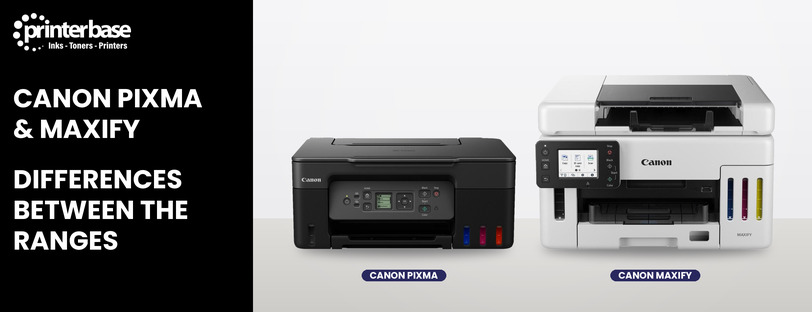
Canon sells two families of inkjet printer, PIXMA and MAXIFY, and on paper they can look very similar. Both print, scan and copy, and both come in cartridge and refillable MegaTank versions. However, they’re built for different people. PIXMA is Canon’s home range, made for a mix of documents, schoolwork and photos. MAXIFY is its business inkjet range, made for home offices and small businesses that print a lot of documents every week.
If you’re trying to decide between the two, this guide covers the differences that matter: ink, speed, paper handling, running costs and photo quality.
The Short Answer: Home Printing Or Business Printing
Choose a Canon PIXMA if you print a little of everything at home. That means letters, homework, the odd boarding pass and, most importantly, photos. PIXMA printers are compact, cheaper to buy, and the best of them produce excellent borderless photo prints.
Choose a Canon MAXIFY if you print mainly documents and do it often. MAXIFY printers are faster, hold more paper, mostly have an automatic document feeder (ADF), and use pigment inks that keep text sharp and resist smudging. They’re designed to sit in a home office or small office and work hard every day.
In short, PIXMA trades speed and paper capacity for photo quality and a smaller footprint. MAXIFY does the opposite.
What Is A Canon PIXMA Printer?
PIXMA is Canon’s long-running range of home inkjet printers. Canon describes them as versatile printers for photos and everyday documents, and most models are all-in-ones that print, scan and copy. The range splits into a few sub-series, and the letters at the start of the model name tell you which one you’re looking at.
PIXMA TS Series
The TS models are Canon’s mainstream home printers. A typical example is the PIXMA TS5350i, which prints at around 13 images per minute (ipm) in mono and 6.8 ipm in colour, holds 100 sheets in a front cassette plus 100 in a rear tray, and prints borderless photos up to A4. It uses two FINE cartridges, one black and one colour.
PIXMA TR Series
The TR models lean towards home working. For example, the PIXMA TR7650 adds a 20-sheet ADF and two-way paper feed, so it copes better with multi-page documents than a TS model.
PIXMA G Series (MegaTank)
The G series swaps cartridges for refillable ink tanks filled from bottles. The PIXMA G3570, for instance, gets around 6,000 black pages and 7,700 colour pages from its ink, and can print roughly 2,200 10x15cm photos. In return, it’s slower (about 11 ipm mono) and has a single 100-sheet rear tray. If you want to know more about how these work, read our guide What Is An Ink Tank Inkjet Printer?.
PIXMA PRO And iX Series
At the top of the range, the PIXMA PRO models such as the PRO-200S are dedicated A3+ photo printers. Meanwhile, the iX6850 is an A3+ printer with five individual inks. These are specialist machines for photographers and crafters rather than everyday home printers.
What Is A Canon MAXIFY Printer?
MAXIFY is Canon’s business inkjet range. Canon positions it for small offices and home offices, and every model is built around document printing first. As with PIXMA, you can buy MAXIFY printers with cartridges or with refillable MegaTank ink tanks.
MAXIFY MB Series (Cartridges)
The MB models use individual ink cartridges. They cost less to buy than the GX models and suit low to medium print volumes. Take the MAXIFY MB2750: it prints at up to 24 ipm in mono, holds 500 sheets across two 250-sheet cassettes, has a 50-sheet ADF, and adds fax and Ethernet. Canon recommends it for 200 to 1,000 pages a month, with a duty cycle of up to 20,000 pages.
MAXIFY GX Series (MegaTank)
The GX models combine MAXIFY’s business features with refillable ink tanks. The MAXIFY GX6550, for example, prints at around 24 ipm mono and 15.5 ipm colour. It holds 250 sheets in a cassette plus 100 in a rear tray, and has a 35-sheet duplex ADF. Its bottles are rated at around 6,000 black pages and 14,000 colour pages, and it supports business network security such as WPA3 and IEEE 802.1X. We compare these models with laser printers in Canon MAXIFY GX Ink Tank Printers vs Laser Printers.
MAXIFY BX110
The BX110 is the odd one out. It’s a compact, battery-powered wireless printer for people who need to print on the move.
Key Differences Between PIXMA And MAXIFY
Here’s how the two ranges compare side by side, using current Canon UK models as examples.
| Feature | Canon PIXMA | Canon MAXIFY |
|---|---|---|
| Designed For | Home users, families, students, photo printing | Home offices and small businesses |
| Ink | Pigment black with dye-based colour inks | Pigment inks, marker and water resistant |
| Mono Speed | Around 11 to 13 ipm (G3570, TS5350i) | Up to 24 ipm (MB2750, GX6550) |
| Paper Capacity | 100 to 200 sheets (G3570, TS5350i) | 350 to 500 sheets (GX6550, MB2750) |
| ADF | On some models, such as the TR series | On most models |
| Photo Printing | Strong, with borderless prints and dedicated photo models | Fine for business graphics, not the best for photos |
| Cartridge Or Tank | TS/TR cartridges, G series MegaTank | MB cartridges, GX series MegaTank |
| Extras | Creative apps and templates, compact designs | Fax and Ethernet on many models, business network security |
Ink: Dye Colour Vs Pigment
This is the difference most people miss. PIXMA printers combine a pigment black ink for text with dye-based colour inks. Dye inks soak into paper and give rich, glossy colour, which is why PIXMA photos look so good. MAXIFY printers, on the other hand, use pigment inks, which sit on top of the paper. Canon says MAXIFY inks resist markers, friction and water, so a highlighted invoice or a contract that gets damp won’t smear.
Speed And Paper Handling
MAXIFY models are roughly twice as fast as an equivalent PIXMA for mono documents. They also hold more paper, and the bigger models take a second cassette. Add an ADF for scanning and copying stacks of pages, and the MAXIFY range saves a lot of time if you handle paperwork every day.
Running Costs
Running costs depend more on cartridge or tank than on PIXMA or MAXIFY. A standard PIXMA cartridge such as the PG-560 lasts around 180 pages, while a MAXIFY PGI-1500XL black cartridge lasts around 1,200 pages. Switch to MegaTank and both ranges get much cheaper per page, since a set of bottles lasts thousands of pages. In fact, the MegaTank GX6550’s colour bottles last almost twice as long as those in the G3570.
Photo Quality
PIXMA wins here, and it isn’t close. PIXMA printers support borderless photo printing in sizes from 10x15cm up to A4, and the PRO models go to A3+. A MAXIFY will print a perfectly good chart, flyer or product sheet, but it isn’t the printer to choose for family photos.
Which Canon Inkjet Printer Should You Choose?
Start with what you print most, then think about how much you print. Here’s a quick guide.
- You print photos, schoolwork and the odd letter: a PIXMA TS model is the simplest choice. For example, see our pick of the 5 Best Canon Inkjet Printers For The Home.
- You print a lot at home but still want photos: a PIXMA G series MegaTank keeps costs down without giving up photo quality.
- You work from home and scan or copy documents: a PIXMA TR model or a MAXIFY MB model gives you an ADF. If you print more than a couple of hundred pages a month, go for the MAXIFY.
- You run a small business: a MAXIFY GX MegaTank is the one to look at. It’s fast, holds plenty of paper, and has the lowest running costs in the range. Our guide to the 8 Best Canon MAXIFY Business Ink Tank Printers goes into more detail.
- You’re a photographer or crafter: look at the PIXMA PRO models instead. Our list of the best photo printers is a good place to start.
Still not sure? We stock every current model, and our team is always happy to help you choose. See our contact details below and give them a call now.
Conclusion
PIXMA and MAXIFY are both Canon inkjets, but they solve different problems. PIXMA is the home range. It’s compact and affordable, and it’s at its best when you want good photos alongside everyday documents. MAXIFY is the business range, with faster print speeds, bigger paper trays, ADFs and pigment inks that keep text crisp and smudge-free.
The cartridge or MegaTank choice sits on top of that. If you print regularly, a MegaTank model in either range will cost far less to run, even though it costs more upfront. Therefore, the best way to decide is to work out what you print most and roughly how many pages a month you get through. A family printing photos and homework will be happier with a PIXMA, while a home office printing invoices every day will get more from a MAXIFY. When you know which range fits, browse our Canon inkjet printers to compare current models and prices.
Frequently Asked Questions
Is Canon MAXIFY Better Than PIXMA?
Neither is better across the board. MAXIFY is better for frequent document printing, thanks to faster speeds, larger paper trays and pigment inks. PIXMA is better for photos and mixed home use, and it usually costs less to buy.
Can A Canon MAXIFY Printer Print Photos?
Yes, it can print photos and colour graphics. However, MAXIFY printers are tuned for documents, so a PIXMA will give you richer, glossier photo prints, especially on photo paper.
Do PIXMA And MAXIFY Printers Use The Same Ink?
No. Each range uses its own cartridges and ink bottles, and they aren’t interchangeable. For example, the PIXMA TS5350i takes PG-560 and CL-561 cartridges, while the MAXIFY MB2750 takes PGI-1500XL cartridges.
What Is The Difference Between PIXMA G And MAXIFY GX?
Both are MegaTank printers with refillable ink tanks. The PIXMA G series is aimed at home users and uses dye-based colour inks that suit photos. Meanwhile, the MAXIFY GX series is aimed at businesses, with faster speeds, more paper capacity, an ADF on most models and pigment inks.
Which Is Cheaper To Run, PIXMA Or MAXIFY?
It depends on the model more than the range. MegaTank models in either range cost far less per page than cartridge models. Between cartridge models, MAXIFY XL cartridges last much longer than standard PIXMA cartridges, so the cost per page is usually lower.
Is MAXIFY A Good Alternative To A Laser Printer?
For many small offices, yes. A MAXIFY GX prints at laser-like speeds for everyday documents and prints in colour at a low cost per page. Our MAXIFY GX vs laser comparison covers the pros and cons in more detail.
Are PIXMA Printers Suitable For Home Working?
Yes, for light use. A PIXMA TR model adds an ADF for scanning and copying documents. If you print several hundred pages a month, though, a MAXIFY will be faster and more reliable for that workload.
Need Help or More Information ?
If you need any further help or more information, reach out to us by leaving a comment below or through one of the many ways on our Contact Us page.
Alternatively you can contact us by Phone on 0161 308 5800 or by Live Chat on our main Website Monday to Friday and our team will be happy to help or answer with any questions you might have.
You can also find all the various ways to connect with Us at the bottom of this page. Please share this post if you found it helpful.