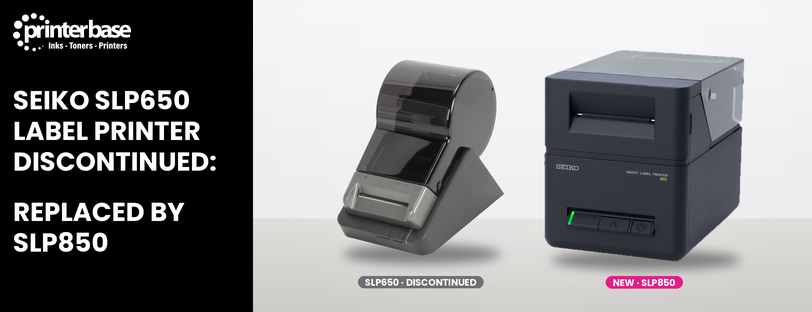
Seiko has discontinued the SLP650 USB Label Printer. It was a top-selling label printer and prints address labels, shipping labels and visitor badges on desks across the UK. If you already own one, it will keep working. However, once current stock runs out you won’t be able to buy it new.
The good news is that Seiko has a direct replacement: the Seiko SLP850 2″ Direct Thermal USB Label Printer. It prints faster, takes up less space and works with the labels you already have with support for linerless labels. Below, we look at what’s changed and how your existing labels will work in the new model.
Seiko SLP850 2″ Direct Thermal Label Printer
Key Differences
- SLP850 Keeps Direct Thermal Printing, So There Are Still No Ribbons To Buy
- SLP850 Prints Faster: Up To 120mm Per Second vs 100mm Per Second
- SLP850 Supports Linerless Labels With No Backing Paper
- SLP850 Has A Smaller Footprint, With Reduced Height And Depth
- SLP850 Prints From Smartphones And Tablets Via The SII Layout Editor App
- SLP850 Keeps The Same 300dpi Print Resolution
- SLP850 Works With Your Existing SLP650 Label Rolls
Seiko describes the SLP850 as the direct replacement for the popular SLP650, and in day-to-day use it will feel familiar straight away. It’s still a compact 2″ desktop label printer that connects over USB and prints at 300dpi, so text, logos and barcodes stay crisp.
Where it moves ahead is speed and size. The SLP850 prints at up to 120mm per second, compared with 100mm per second on the SLP650, which makes a real difference when you’re running off a long batch of shipping labels. On top of that, Seiko has cut the height and depth of the body, so it sits more comfortably on a busy reception desk or packing bench.
Software has moved on too. The bundled Seiko Label Editor includes plug-ins for popular word processing, spreadsheet, email and database programs, so you can print an address straight from a contact or spreadsheet. In addition, it supports common barcode types including Code 128, EAN-13, QR Code and Data Matrix. For mobile printing, the SLP850 also works with smartphones and tablets through Seiko’s SII Layout Editor app.
There are two part numbers for the Seiko SLP850 USB label printer 42-900817 UK Version and 42-900815 EU Version. Both are identical with same specifications.
Direct Thermal Printing: No Ink or Toner Needed
Like the SLP650, the SLP850 uses direct thermal printing, so nothing changes in how you run it day to day. You do not need to buy ink, toner or ribbon.
Instead, the printhead heats chemically treated, heat-sensitive labels, which darken wherever the heat touches them. The result is sharp labels that scan easily, with low maintenance costs.
Why Direct Thermal Suits Everyday Labelling
- Lower running costs: no ribbons, ink or toner to buy
- Simpler to use: load a roll of labels and print, with no ribbon changes or ribbon matching
- Less maintenance: fewer consumables to manage means less downtime
- Less waste: no used ribbons to throw away, and on the SLP850, linerless labels remove the backing paper too
- Ideal for everyday labelling: address labels, shipping labels, visitor badges and file folders
Bear in mind that direct thermal labels are sensitive to heat and sunlight, so they can fade over a long period. For mailing and office jobs this rarely matters. However, if you need labels that last for years or survive harsh conditions, a ribbon-based label printer is a better fit.
The Linerless Capability Adds More Value
Linerless printing is the biggest new feature on the SLP850, and it’s the main reason it offers better value than the SLP650. Seiko says it’s the first label printer in its class to support linerless labels at this price point, which makes it the cheapest way to start printing linerless labels in this class. Better still, it works with them straight out of the box. There are no extra parts to fit and no modifications to make, so you can switch between standard die-cut rolls and linerless rolls whenever you like.
How Linerless Labels Work
A standard label sits on a backing sheet, called a liner, which you peel off and throw away. Linerless labels do away with it. Instead, the top of each label has a release coating that stops the roll sticking to itself, much like a roll of tape. As the roll feeds through the SLP850, it prints each label and its cutter trims it to length, ready to stick.
Better For The Environment
The liner makes up roughly 40 to 50% of the weight and volume of a traditional label roll. Because it’s coated with silicone, it’s also difficult to recycle, so most of it ends up in general waste. With linerless labels, that waste disappears completely. As a result, you throw less away, and fewer materials go into making, packing and delivering every roll.
Why It Makes A Difference Day To Day
- More labels per roll: without a liner, a roll of the same size typically holds 40 to 60% more labels, so you change rolls less often.
- Labels sized to fit: you can print each label to the length your content needs, rather than a fixed die-cut size, so there’s no wasted blank space.
- Quicker labelling: with no backing to peel, you can print and apply labels faster, which helps on a busy packing bench or reception desk.
- Less storage space: more labels on every roll means fewer boxes of stock to keep in the cupboard.
- No liner mess: no scraps of backing paper left on desks, floors or in bins.
Better Value Than The SLP650
The SLP650 could only print on standard die-cut labels. By contrast, the SLP850 gives you both options in one printer, with no extra hardware. In other words, you can keep using the labels you already have, then move to linerless rolls when it suits you. That flexibility, together with the savings on waste, roll changes and storage, makes the SLP850 better value for money than the printer it replaces.
Will My SLP650 Labels Work In The SLP850?
Yes, and that’s good news if you have a cupboard full of label rolls. Here are the key compatibility details:
- Traditional labels: you can use your existing stock of SLP650 address labels, shipping labels, file folder labels, name badges and multipurpose rolls in the SLP850 without modification.
- New media support: as well as standard die-cut rolls, the SLP850 also supports linerless labels, which have no backing paper to throw away. The older SLP650 couldn’t handle these.
- Roll width limit: standard die-cut rolls must stay within the SLP850’s supported width limit of 2.28 inches (57.9mm).
Not sure which labels suit your job? Our guide to printing postage labels at home is a good place to start.
Seiko SLP650 vs SLP850: Quick Comparison
Here’s how the two label printers compare on the specifications that matter most.
| Specification | Seiko SLP650 | Seiko SLP850 |
|---|---|---|
| Print Technology | Direct thermal | Direct thermal |
| Print Resolution | 300dpi | 300dpi |
| Print Speed | 100mm per second | Up to 120mm per second |
| Max Label Width | 58mm | 2.28″ (57.9mm) |
| Linerless Labels | Not supported | Supported |
| Mobile Printing | Limited | Smartphones and tablets via SII Layout Editor |
| Interface | USB | USB |
| Status | Discontinued | Available now |
Verdict
The SLP650 was a firm favourite with our customers, so it’s a shame to see it go. Still, the SLP850 is a worthy successor rather than a compromise. It prints faster, takes up less desk space and keeps the same sharp 300dpi output. Better still, it sticks with direct thermal printing, so there are still no ribbons to buy. Your existing label rolls will carry on working, so switching won’t leave you with wasted stock. On top of that, support for linerless labels and mobile printing gives you options the SLP650 never had. If your SLP650 is still running well, there’s no need to rush. However, when it’s time to replace it, or if you need a second printer for another desk, the SLP850 is the one to choose.
If you’d like to compare it with other models first, browse our full range of label printers, read our guide to what a label printer is, or learn more about linerless label printers.
Frequently Asked Questions
Has The Seiko SLP650 Been Discontinued?
Yes. Seiko has discontinued the SLP650 USB Label Printer, and the SLP850 2″ Direct Thermal USB Label Printer is its direct replacement.
What Replaces The Seiko SLP650?
The Seiko SLP850. It prints at up to 120mm per second at 300dpi, connects over USB and supports both standard die-cut and linerless labels.
What Are The Part Numbers For The Seiko SLP850?
There are two versions. The EU version is 42-900815 and the UK version is 42-900817.
Can I Use My SLP650 Labels In The SLP850?
Yes. Your existing SLP650 address, shipping, file folder, name badge and multipurpose rolls work in the SLP850 without modification, as long as they’re within the 2.28 inch (57.9mm) width limit.
Does The Seiko SLP850 Need A Ribbon?
No. Like the SLP650, the SLP850 is a direct thermal printer, so it prints straight onto heat-sensitive labels. As a result, there are no ribbons, ink or toner to buy.
What Are Linerless Labels?
Linerless labels have no backing paper. Instead, the roll has a release coating that stops the labels sticking to each other, and the printer cuts each label to length. That means there’s less waste to throw away. The SLP850 supports them, whereas the SLP650 didn’t.
Will My SLP650 Stop Working Now It’s Discontinued?
No. A discontinued printer keeps working as normal, and compatible Seiko labels are still widely available. In other words, you only need to switch when you’re ready.
Need Help or More Information ?
If you need any further help or more information, reach out to us by leaving a comment below or through one of the many ways on our Contact Us page.
Alternatively you can contact us by Phone on 0161 308 5800 or by Live Chat on our main Website Monday to Friday and our team will be happy to help or answer with any questions you might have.
You can also find all the various ways to connect with Us at the bottom of this page. Please share this post if you found it helpful.